 Panasonic Electric Works Networks Co., Ltd. > Support > Setting Examples > VLAN (data + voice) Setting Procedure (for WEB)
ここから本文です。
VLAN (data + voice) Setting Procedure (for WEB)
Introduction
This setting example explains the procedure of VLAN (data + voice) Setting for the switches for WEB.
Applicable models
| Applicable models | |
|---|---|
| Product number | Product name |
| PN28248 | Switch-M24eGLPWR+ |
| PN28168 | Switch-M16eGLPWR+ |
| PN28128 | Switch-M12eGLPWR+ |
| PN28088 | Switch-M8eGLPWR+ |
| PN28058 | Switch-M5eGLPWR+ |
| PN23249K | Switch-M24PWR |
| PN23169K | Switch-M16PWR |
| PN23129K | Switch-M12PWR |
Overview
Create VLAN10 for voice on all ports to handle PC (packet without tag) by VLAN1 (default) and voice (packet with VLAN10 tag) by VLAN10.
Configuration Example
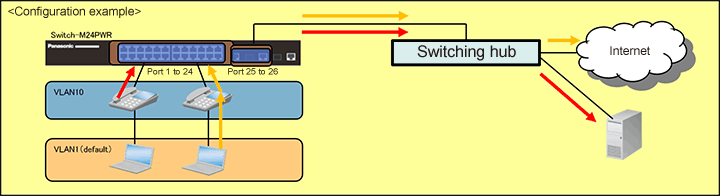
Setting Flow
- 1. Connect to the Web management screen of Switch-M24PWR.
- 2. Set Switch-M24PWR.
- 1) Create VLAN group 10 (VLAN ID=10, VLAN Name=IP_Phone, Port Members=1-26).
- 2. Configure QoS to prioritize voice data transmission.
- 3. Confirm that PC (packet without tag) is handled by VLAN1 and voice (packet with VLAN10 tag) by VLAN10 to connect to the Internet and server.
Setting Procedure
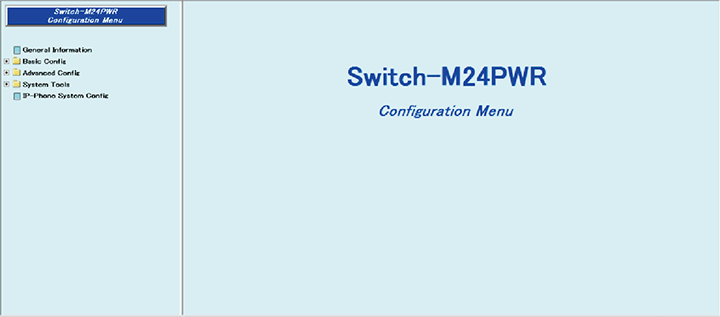
Step 1. Connect to the Web management screen of Switch-M24PWR and login.
Connect the PC and Ethernet Switch using a twisted pair cable and console cable, and connect to the Web management screen of Switch-M24PWR.
(Refer to setting example “Connection Procedures to Ethernet Switch Web Management Screen” for the procedure to connect to the Web management screen)
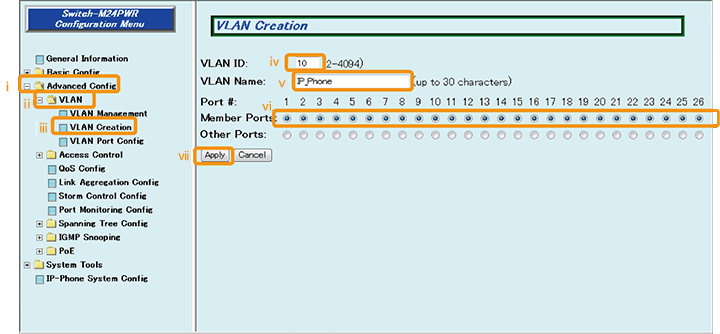
Step 2. Create VLAN for voice.
1) Select “Advanced Config” → “VLAN” → “VLAN Creation” (i → ii → iii).
2) Enter “10” in “VLAN ID” (iv).
3) Enter “IP_Phone” in “VLAN Name” (v).
4) Confirm that checks are placed in “1 to 26” of “Member Ports” (vi).
5) Select “Apply” to apply the changes (vii).
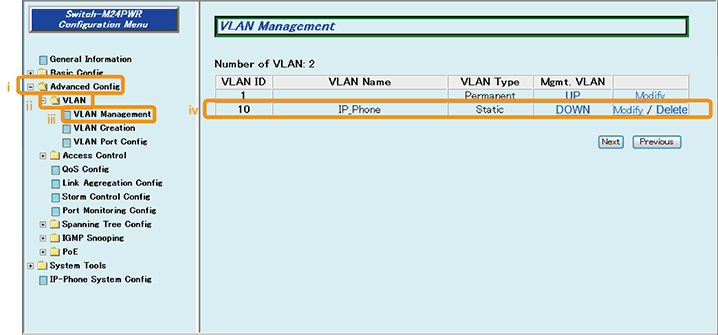
Step 3. Confirm that VLAN10 is created.
1) Select “Advanced Config” → “VLAN” → “VLAN Management” (i → ii → iii).
2) Confirm that “VLAN10 (VLAN ID = 10, VLAN Name = IP_Phone)” has been added to “VLAN ID” (iv).
Step 4. Configure QoS to prioritize voice data transmission.
Configure the QoS priority control to prioritize voice data transmission.
For setting method, refer to the setting example "QoS Setting Procedure".
Step 5. Connect the devices.
Referring to the configuration example, connect the devices.
Step 6. Execute operation check.
Confirm that PC (packet without tag) is handled by VLAN1 and voice (packet with VLAN10 tag) by VLAN10 to connect to the Internet and server.
ここからサブメニューです。