 Panasonic Electric Works Networks Co., Ltd. > Support > Setting Examples > Traffic Segmentation Setting Procedure (ZEQUO series)
ここから本文です。
Traffic Segmentation Setting Procedure (ZEQUO series)
Introduction
This setting example explains the procedure of Traffic Segmentation Setting for ZEQUO series switches.
Traffic segmentation is a function that is equivalent to the port grouping function for Ethernet Switch.
Applicable models
| Applicable models | |
|---|---|
| Product name | Product number |
| ZEQUO 6400 | PN36240E |
| ZEQUO 2200 | PN26241 |
| ZEQUO 2210 | PN26161 |
Overview
This procedure describes how to set traffic segmentation for ZEQUO series switches.
It sets the traffic segmentation to restrict the ports that can communicate.
Configuration Example

Overall setting flow
- 1. Set data received at Ports 1-8 to be transferred to Ports 1-8 and 17-24.
- 2. Set data received at Ports 9-16 to be transferred to Ports 9-24.
- 3. Set data received at Ports 17-24 to be transferred to all ports.
Setting Procedure
Step 1.
Connect the PC and Ethernet Switch using a twisted pair cable and console cable, and display the setting screen on Hyper terminal.
(Refer to Setting Example "Ethernet Switch Connection Procedure to a Console Port" for the procedure to display the setting screen on the console port)
Step 2.
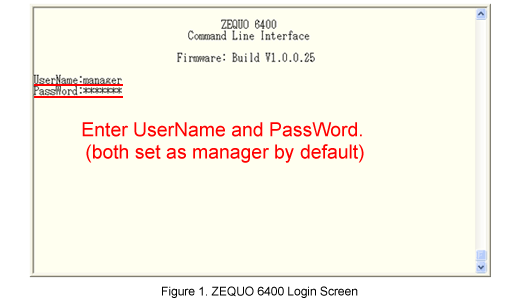
On the login screen, enter UserName and PassWord (both set as manager by default), and login to the setting screen.(Refer to Figure 1)
Step 3.
Set the traffic segmentation for Port1-8 of ZEQUO 6400.
After Z6400:admin#, enter command as shown in the following.
Z6400:admin#config traffic_segmentation 1-8 forward_list 1-8,17-24
If the command is entered correctly, the following messages will appear.
Command: config traffic_segmentation 1-8 forward_list 1-8,17-24
Success.
Then, set traffic segmentation for Ports 9-16 and 17-24.
Z6400:admin#config traffic_segmentation 9-16 forward_list 9-24
Command:config traffic_segmentation 9-16 forward_list 9-24
Success.
Z6400:admin#config traffic_segmentation 17-24 forward_list all
Command:config traffic_segmentation 17-24 forward_list all
Success.
Step 4.
Check the traffic segmentation set to ZEQUO 6400.
Z6400:admin#show traffic_segmentation
Command: show traffic_segmentation
Traffic Segmentation Table
Port Forward Portlist
---- ------------------------------------------------------------------------
1 1-8,17-24
2 1-8,17-24
3 1-8,17-24
4 1-8,17-24
5 1-8,17-24
6 1-8,17-24
7 1-8,17-24
8 1-8,17-24
9 9-24
10 9-24
11 9-24
12 9-24
13 9-24
14 9-24
15 9-24
16 9-24
17 1-28
18 1-28
19 1-28
20 1-28
21 1-28
22 1-28
23 1-28
24 1-28
25 1-28
26 1-28
27 1-28
28 1-28
Step 5.
When all the settings are complete, save the settings.
Z6400:admin#save
Command:save
Saving all configurations to NV-RAM.......... Done.
Step 6.
Confirm that communication between groups are properly controlled.
ここからサブメニューです。