 Panasonic Electric Works Networks Co., Ltd. > Support > Setting Examples > Storm Control Setting Procedure(GA-MU/XG-MU Series)(for WEB)
ここから本文です。
Storm Control Setting Procedure(GA-MU/XG-MU Series)(for WEB)
Introduction
In this setting example, we will explain the link aggregation settings for the GA-MU/XG-MU series.
Applicable models
Overview
Storm control is a function that suppresses storms of broadcast, multicast, and unicast traffic.
Configuration Example
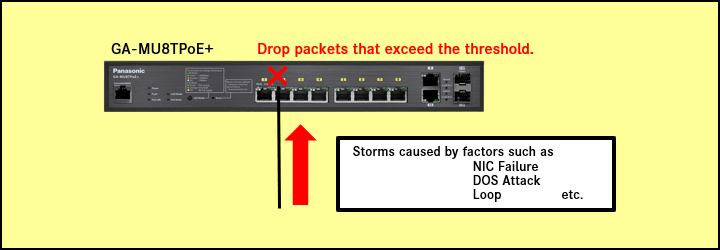
Explanation
- Enable storm control on ports 1-8.
- On ports 1-8, when a storm occurs, broadcast traffic exceeding a rate of 160 kbps is dropped.
Setting Procedure
Step 1.
Connect the PC to the LAN port of the switching hub.
Step 2.
On the login screen, enter the User Name and Password to log in to the Web interface.
Step 3.
Set the storm control threshold.
(Ports:1-8 Packet: Broadcast Threshold:160kbps)
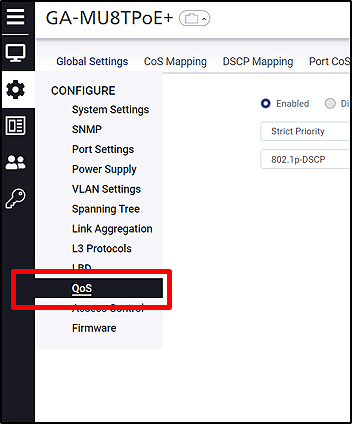
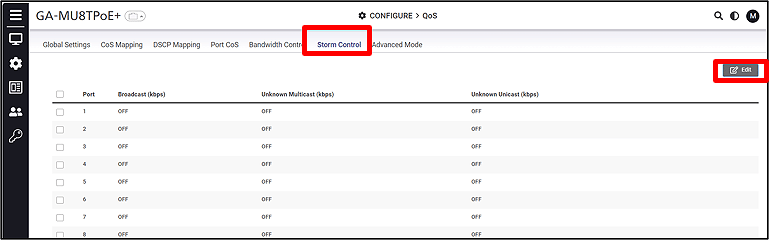
CONFIGURE > QoS > Storm Control
Step 4.
Select the ports and click Edit (Ports: 1-8).
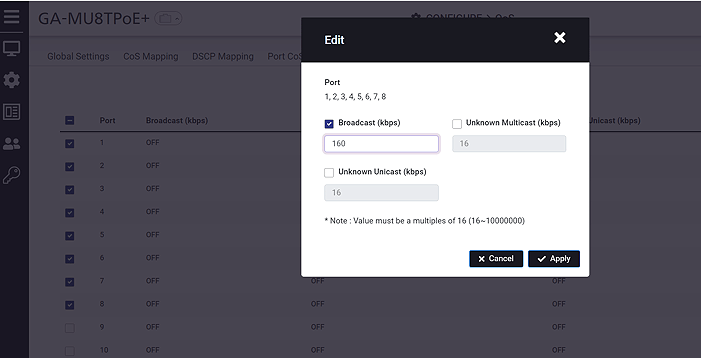
The setting value must be a multiple of 16.
ここからサブメニューです。