 Panasonic Electric Works Networks Co., Ltd. > Support > Setting Examples > IP Address Setting Procedure(GA-MU/XG-MU Series)(for WEB)
ここから本文です。
IP Address Setting Procedure(GA-MU/XG-MU Series)(for WEB)
Introduction
In this setting example, we will explain how to change the IP address configured for the management VLAN of the switching hub.
Applicable models
Overview
An IP address is an identification number at the network layer that is assigned to identify devices on a network using IP.
Configuration Example
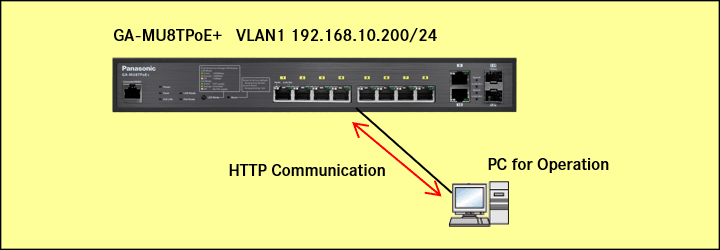
<Settings>
After the initial login, change the IP address of the management VLAN.
| Setting Items | Setting Values | Default Setting |
|---|---|---|
| configuration | static | DHCP |
| VLAN | 1(default) | 1(default) |
Setting Procedure
Step 1.
Connect the PC to the LAN port of the switching hub.
Step 2.
On the login screen, enter the User Name and Password to log in to the Web interface.
Note: For the initial login, please refer to “Web Console Initial Login Procedure.”
Step 3.
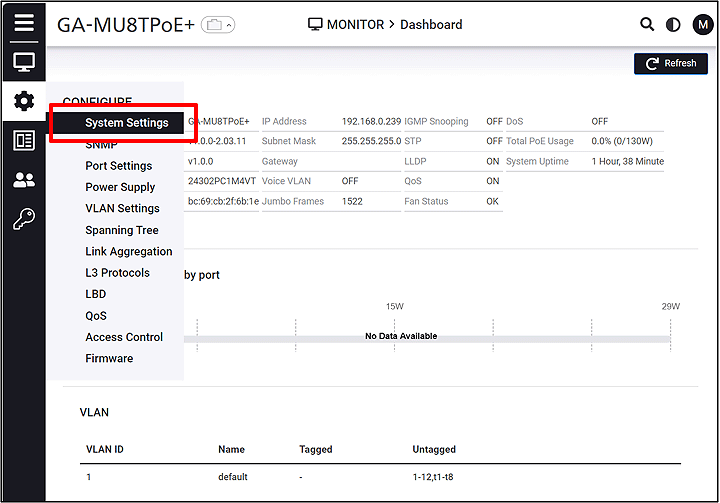
Follow the steps below to proceed to IP Settings.
CONFIGURE > System Settings > IP Settings
Step 4.
Change the IP Address. (IP:192.168.1.200 Subnet Mask :255.255.255.0 Gateway :192.168.1.254)
IP Settings > IPv4 Management
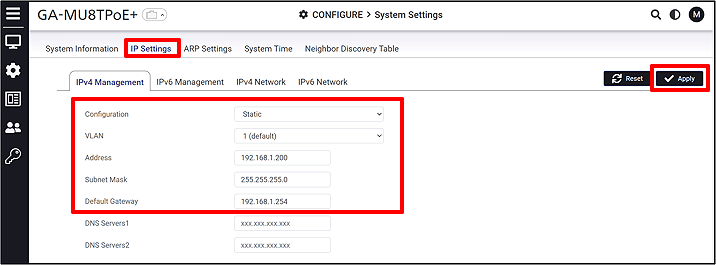
Note: The configuration is saved to the startup configuration by clicking Apply.
Step 5.
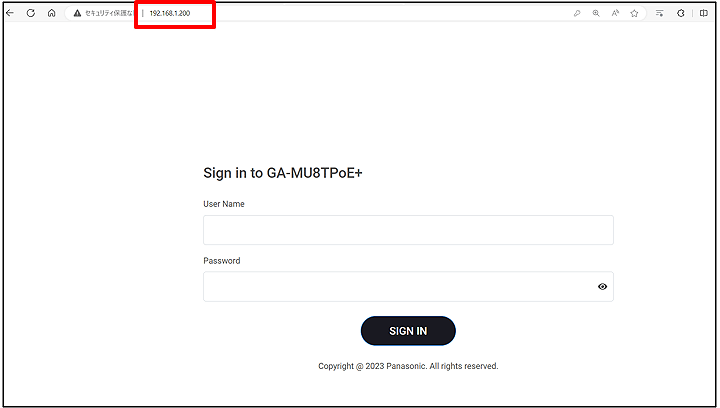
Reconnect using “192.168.1.200” and verify that the IP address has been changed.
ここからサブメニューです。