ページの先頭です。
 Panasonic Electric Works Networks Co., Ltd. > Support > Customers Using Panasonic i-PRO Network Camera System Ethernet Switches
ここから本文です。
Customers Using Panasonic i-PRO Network Camera System Ethernet Switches
■ When using a Ethernet Switch for the i-PRO system under the conditions below,
please change the buffer expansion (egress buffer threshold) setting value from "mid" to "high".
- When using the ZEQUO RE Series
- When using the GA-ML Series and the total output bit rate to the recorder exceeds 192 Mbps (*1)
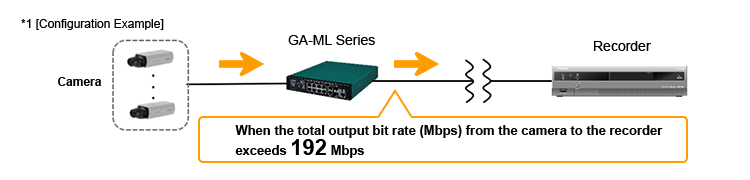
*If the setting value is not changed to "high", communication disturbances such as video degradation or stuttering may occur due to packet loss.
Introduction
Steps for changing the buffer expansion (egress buffer threshold) setting value of the ZEQUO RE Series / GA-ML Series from "mid" to "high".
Applicable Models
GA-ML Series(PoE+ / GIGA)
ZEQUO Series-Layer3 Core Switch(GIGA)
Setting Procedure
Step 1.
Switch from User EXEC Mode to Privileged EXEC Mode.
Command: enable
ZEQUO6600RE>enable
ZEQUO6600RE#
Step 2.
Check the buffer expansion setting value. (Check while in Privileged EXEC Mode)
Command: show egress buffer threshold
ZEQUO6600RE#show egress buffer threshold
Egress Buffer Threshold State: mid *The default setting is "mid".
Step 3.
Switch from Privileged EXEC Mode to Global Configuration Mode.
Command: configure terminal
ZEQUO6600RE#configure terminal
ZEQUO6600RE(config)#
Step 4.
Change the buffer expansion setting value to "high". (Change while in Global Configuration Mode)
Command: egress buffer threshold high *Change the buffer expansion setting value to "high".
ZEQUO6600RE(config)#egress buffer threshold high
Step 5.
Switch from Global Configuration Mode to Privileged EXEC Mode.
Command: exit
ZEQUO6600RE(config)#exit
ZEQUO6600RE#
Step 6.
Confirm that the buffer expansion setting value has been changed. (Check while in Privileged EXEC Mode)
Command: show run
ZEQUO6600RE#show run
egress buffer threshold high *Confirm that the buffer expansion setting value has been changed to "high".
Step 7.
Save the settings. (Perform while in Privileged EXEC Mode)
Command: copy running-config startup-config
ZEQUO6600RE#copy running-config startup-config
ここからサブメニューです。
Panasonic Electric Works Networks Co., Ltd. > Support > Customers Using Panasonic i-PRO Network Camera System Ethernet Switches
